


Landscape HC-TT – Motorless Lo-Fi Tape Scraper, Scratcher & CV Control
Landscape HC-TT – Motorless Lo-Fi Tape Scraper, Scratcher & CV Control

Couldn't load pickup availability
-
Loyalty Reward Earn £6.70 in Loot Credits with this purchase.
-
UK shipping Price includes UK VAT. No hidden customs charges.
-
Loot Synergy 2% of your total order back in Loot Credits for use at lootaudio.com.
-
Authorized Retailer Official UK partner. Full manufacturer warranty.
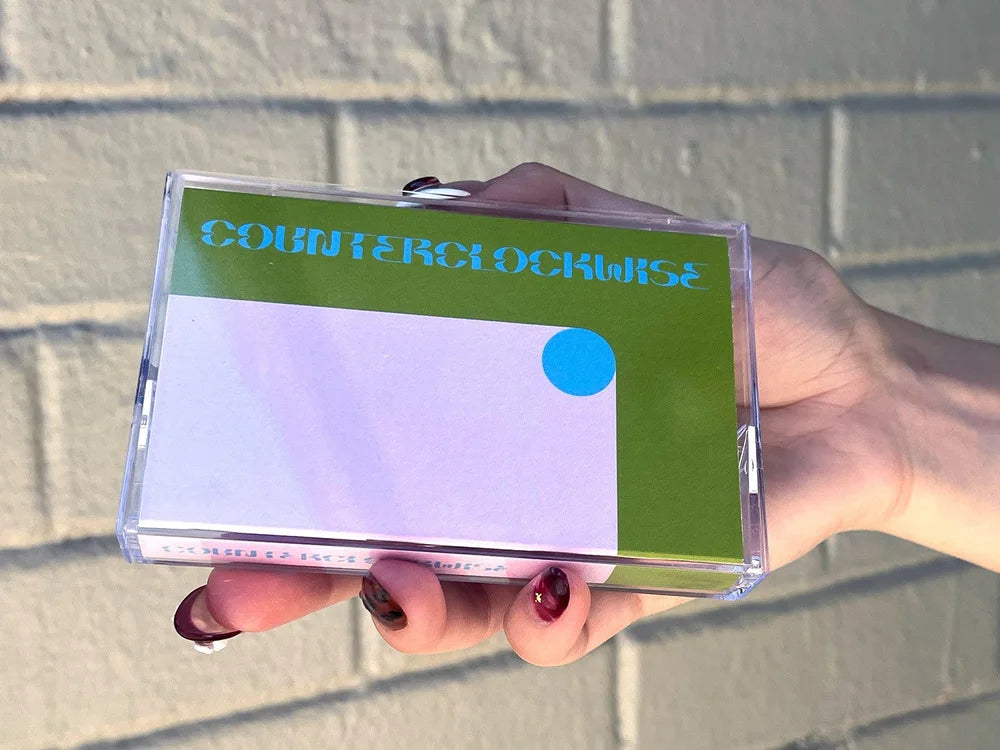
The HC-TT is a compact cassette manipulation device which allows you to manually play and manipulate a cassette tape. Sound will only be produced while your hands are turning either of the large playback knobs, resulting in rich, unstable low-fi textures. By turning these knobs, you are directly rotating the cassette spindles which moves the tape across the internal tape head. The knobs “play” a regular cassette forwards and backwards. The results are reminiscent of scratching a vinyl record, or of the satisfying, sludgy sounds of slow tape. There’s no motor in this device, so direction and speed is left to the performer. The illuminated touch switch is a momentary mute for both the mono audio output and the CV/Gate outputs. The Arches and Moons touch plates allow for feedback and other strange interactions. This device does not record audio but only outputs pre-recorded audio from any cassette tape. The HC-TT comes a power adapter, and with COUNTERCLOCKWISE, an open-source sample compilation cassette featuring various artists, produced by Landscape.

What it can do
- “scratch” cassette tapes
- direct human-mechanical connection to playback speed, allowing for gestural responsiveness
- works with any cassette tape (but not with tape loops)
- create rhythmic effects by directionally tapping knobs or using the momentary mute
- access new creative possibilities for your old cassette collection

How to use it
-
POWER: Use a 9-12v regulated tip (+) power supply (like the one that comes with your unit; DC jack on the back edge). The HC-TT can also be powered with a 9v battery if you purchase a tip (+) 2.1mm plug to 9V battery adapter from your local electronics store.
-
AUDIO OUTPUT: The main 1/4" mono output is on the left side panel (up arrow). Plug into a mixer, guitar pedal, etc.
-
INSERT CASSETTE: Lift both playback knobs until they stop and hold them up with one hand. Slide your chosen tape gently into the cassette shaped opening with the exposed tape going in first. Let the knobs fall back down and seat fully into the cassette spindles (you will sometimes hear/feel them lock into place when fully seated).
-
MOVE TAPE: Spin the Forwards or Backwards knob in the direction indicated by the knob’s arrow (larger left knob is forwards and right knob is backwards). There is no motor or automatic playback in this device. You are the motor. Only move one knob at a time, and only in the direction indicated. Otherwise, the tape will go slack and you may not hear sound. While turning the knobs in the right direction, you will feel the tension of the tape inside. Each knob should be turned by itself until you are able to get the feel of the taut tape which will then allow for responsive backwards and forwards scrubbing over the tape head, creating sounds similar to scratching vinyl. Two signs that you have reached the end of your tape include no longer hearing audio and/or resistance to spinning either knob. This indicates that it’s time to flip the cassette. If you were to force past the resistance felt at the end of the tape, you risk damaging or breaking the tape, so be careful.
-
GAIN: The top right knob is gain. The gain control at its highest level can add a hint of coloration to the signal. At its lowest level it still allows cleaner audio and lower CV out when moving the tape. The gain is pre-CV/Gate, which means it can be used in tandem with the tone control to effect the CV/Gate envelope follower response.
-
TONE: The top left knob is a lo-fi dirty Tone control, which cuts most bass content at its lowest level and boosts bass content at its highest. This control is pre-envelope follower (pre-CV/Gate) which means it will allow you to adjust your CV/Gate levels and response. You will hear scrubbing sounds when turning this knob and the audio will cut out due to its placement in the feedback path of the circuit. Turning the knob very quickly creates a bass drum like effect, and if you do this while holding the touch mute, the tone will change. Turning the knob quickly can be used to send out a Gate signal or to “mute” audio destructively.
-
MOMENTARY MUTE: There is a Momentary Touch Mute for gating audio (tape or external) and/or CV/Gate outputs at the top left (sunset shape). When you touch, the audio will mute and the LED will turn off.
-
CV/GATE OUTPUTS: 3.5mm CV and Gate outputs (Half Moon and Square, on the back side) allow you to use your chosen tape's audio content in combination with your playing style as a way to manipulate a modular synthesizer. To put it another way, the HC-TT is also a simple tape based "controller" or modulation source. Hand crank a sequencer using the gate output, or "scratch" a VCO with the CV output.
-
TOUCHPOINTS: I/O Feedback Touch Points are indicated by arches and moons on the left side, allowing for touch sensitive analog feedback within the preamp (not to tape) when both are touched. The quality of this feedback is changed by how much skin touches each Point and the positions of the Tone and Gain controls. The feedback you create through your skin also outputs to CV/Gate. This feedback can distort and mangle your manipulated tape sound and incoming audio. By touching only the input pad (arches, on right) you will turn your body into an antenna injecting radio signals, hum or static to the audio and CV/Gate outputs (radio frequencies and results vary greatly by location). You can also use one hand on the input pad, and another hand hovering as a lo-fi “circuit sniffer” to listen to the sounds of laptops, cellphones and other equipment which output EMF.
-
INPUT/OUTPUT: The main 1/4" mono output is on the left side panel (up arrow). There is a 1/4” mono input on the right side panel (down arrow), which allows you to use the HC-TT’s circuitry as a lo-fi overdrive and playable touch feedback processing device. The input does not record to tape. Instead, it goes through the pre-amp circuit (tone and gain) and into the envelope follower. The touch mute will also mute incoming audio.

Tips & Tricks
-
TAPE TIPS: Highly suggested tapes include: your favorite pop album, self-help tapes, books on tape, hypnosis recordings, mix-tapes, your least favorite pop album, classical music, sound effects, children's music, adults' music, lectures, sermons, film scores, dusty unmarked tapes, melted car tapes, 4 track tapes and also additional tapes. Experiment with a wide variety of audio to best understand how the HC-TT will interact with audio density, pitch, and texture. Tapes with high density of audio (metal, rock, gospel, orchestral, etc.) will generally not sound very interesting because of the lack of separation of elements. But music and recordings with greater detail, peaks/valleys and separation (voice, hip-hop, nature sounds, techno, etc.) will generally provide more varied results. Louder recordings will generally allow the greatest amount of clarity. Also note that very loud recordings will overdrive the internal preamp to a greater degree when the gain knob is fully clockwise.
-
SCRATCHING: To effectively scrub or scratch cassette audio, it’s important to feel the tension of the tape when touching both knobs. After tension is felt, then each knob can be moved individually in the direction of the arrows while that tension is held by both hands, perhaps by gently pausing the movement of the opposite knob or by moving it in quick succession. The knobs can also be directionally tapped causing the tape to stutter along the tape head.
-
MUTE EFFECTS: The momentary mute switch allows stuttering effects / rhythmic gating.
-
FEEDBACK: While touching both touch points (arches + moons) and also introducing slight contact towards the sides of the touch mute switch you can change the character of the feedback to sound more liquid. By touching all three directly you will hear bee or mosquito like tonalities which will change depending on the amounts of skin in contact with each of the touch points. Changing the gain and tone knobs should also change these tonalities.
-
STEREO FIELD PAIRING: You can connect and process the HC-TT with the Stereo Field without a cable. Just touch the output (Moons) on the HC-TT while turning either playback knob and also touching the surface of the Stereo Field. Search the surface of the Stereo Field to find inputs and of course create feedback, distortion and dirty filtering. Create feedback on both units and connect them together with your body to listen to them talk to each other. It will be hard to tell who is affecting who here.
-
STABILITY: If you would like slightly less wow and flutter in your manual audio playback, try recording a cassette at a faster speed, if you have a tape recorder or 4 track with this option. This will mean you need to turn the knobs faster for normal playback which can sometimes provide greater stability.
-
INTERFERENCE: Please note that certain electronic devices will create interference when near the HC-TT. It's recommended that devices such as phones, laptops, and ipads not be closer than 1-2 feet away. Or, it's recommended that these devices are moved very close to the HC-TT so that you can listen to the beautiful chatter of Wi-Fi, cellular space and glowing screens. For example, holding your phone in one hand, open your email and refresh to see if any new exciting emails have arrived. (Turn down your speakers!) Keep refreshing over and over while moving the phone over the top of the HC-TT. You can find sweet spots where the signal is very loud and detailed. Another example is to touch the trackpad (making pinching and unpinching motions) on your computer while also touching the moons touch point on the HC-TT. In this way, you can listen to the capacitive sensing of your computer’s trackpad.
Strip away the motor, take literal hold of magnetic tape, and turn cassette archaeology into a physical, highly performative art form. The Landscape HC-TT (Human Controlled Tape Transport) is a completely unique, compact cassette manipulation instrument, lo-fi preamp, and modular CV controller that brings vinyl-style scratching, unstable pitch warbles, and dark tape rumbles into your production workflow. Strikingly constructed entirely out of stacked, heavy-duty 2mm immersion gold PCBs with a gorgeous moss-green finish and signature gold contact paths, the HC-TT contains absolutely no internal motors. Tape speed and direction are 100% dependent on your hands.
FAQs
FAQs
Specifications
Specifications
Returns & Refunds
Returns & Refunds
Warranty
Warranty



Free UK Delivery
On any order over £150

Boutique Gear
The best brands from around the world

Visit Our Showroom
Test the latest gear and socialise in our store [Coming Soon]